Free online TikTok video downloader
OneClickTT is a free online TikTok downloader: paste a video link and save it as MP4 without the TikTok watermark – 720p by default, up to 1080p – or as MP3. No app, no sign-up, works on iPhone, Android and PC.
Need only the sound? Convert TikTok to MP3 instead.
Updated: November 2026
You don't install anything: OneClickTT works right in your browser. No app, no account and no TikTok login needed. The downloader works on Android, iPhone, iPad, Windows, Mac and Linux, in Chrome, Safari, Firefox, Edge or any other modern browser.
No watermark. Save TikTok videos without watermark – no TikTok logo, no username overlay.
MP4 or MP3. Save the full video in HD MP4 or keep just the sound as an MP3 track.
One click, free. Press Quick download and the recommended format is saved at once. No app, no account.
How to download TikTok video by link in 3 steps
Copy the link. Open the video in the TikTok app or on tiktok.com. Tap Share, then Copy link.
Paste it into OneClickTT. Come back to this page and paste the link into the field at the top. Both long links and short ones like vm.tiktok.com work.
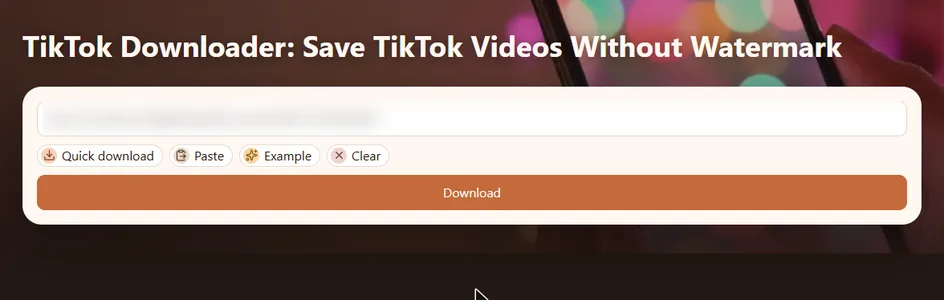
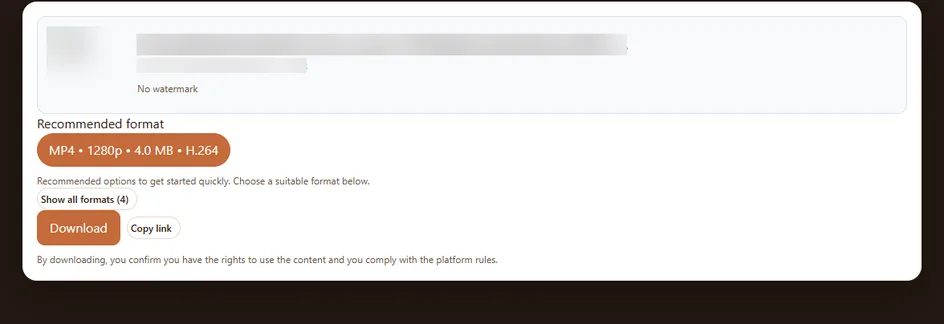
Download. Press Download, choose MP4 (video, up to HD) or MP3 (audio) and the quality, and save the file. In a hurry? Press Quick download – OneClickTT saves the recommended format in one click.
TikTok video downloader for Android, iPhone and PC
Download TikTok videos on Android
Copy the video link in the TikTok app and open oneclicktt.com, our TikTok video downloader, in Chrome or any other browser. Paste the link, tap Download and pick the format – the video is saved without watermark. The file goes to the Download folder, and most galleries show it right away.
Save TikTok video on iPhone and iPad
Use Safari on iOS 13 or newer. Paste the link, tap Download and confirm the download in Safari to save the TikTok video without watermark. The video is saved in the Files app, in Downloads. To move it to Photos, open the file, tap Share and choose Save Video.
Download TikTok on a PC or Mac
Open the video on tiktok.com and copy the address from the browser bar, or use Share → Copy link. Paste it into our TikTok video downloader and click Download to get the TikTok video without watermark. The file is saved to your browser's download folder. No software or extension is needed.
Video won’t save from TikTok or Instagram? Open it in your browser
If you opened OneClickTT from a link inside TikTok, Instagram, Facebook or Telegram, the app’s built-in browser often can’t save files. Tap the ⋯ menu, choose Open in browser (Chrome or Safari), then download the video without watermark again.
How we remove the TikTok watermark
When you press Save video inside TikTok, the app adds a moving logo and the author's username on top of the clip. That is fine for watching, but it gets in the way if you want to edit the video, use it in a presentation or keep a clean copy in your archive.
To download TikTok without watermark, OneClickTT fetches the original file that TikTok stores on its servers, before the logo is added. You get the same picture and sound the creator uploaded, just without the overlay. Some videos are only available with a watermark – usually because of how they were published. In that case we show the version that is available.
TikTok downloader HD: what quality you get
You get the best quality TikTok has for that video, without watermark – HD whenever the original is HD. Most clips come as HD MP4, up to 1080p (1080×1920) in the original vertical format. If the creator uploaded in a lower resolution, the file will be in that resolution too – no downloader can add detail that isn't in the original. MP3 files keep the original audio track of the video.
Which format to choose:
- H.264 (recommended) – standard file size, plays almost everywhere: phones, computers, TVs and CapCut. Best for sending via WhatsApp, editing, or older devices.
- H.265 (HEVC) – smaller file at the same quality, plays on newer phones and computers. Best if you save a lot of videos and want to free up space.
| Format | Quality | Watermark | Best for |
|---|---|---|---|
| MP4 (H.264) | HD up to 720p | No | Any phone, computer, TV, CapCut and WhatsApp |
| MP4 (H.265 / HEVC) | HD up to 1080p, smaller file | No | Newer phones and computers, saving storage space |
| MP3 | Original audio track | — | Music apps, ringtones, your own edits |
TikTok to MP3: save the sound
Heard a song, a voiceover or a trending sound you want to keep? Open the TikTok to MP3 converter and paste the video link. You'll get the audio track as a separate file that plays in any music app and can be used as a ringtone or for your own edits.
What OneClickTT can't do
Private videos. We can only download videos from public accounts. Videos from private accounts, or shared only with friends, are not available.
Deleted videos. If a video was removed from TikTok, there is nothing left to download.
Region- or age-restricted clips. Some videos are blocked in certain countries or behind an age check. These may fail to load.
Photo and slideshow posts. Use the TikTok photo downloader – it saves each image as JPG, all of them in one ZIP, or the slideshow as MP4 with music.
If the TikTok video won’t download
- The link is incomplete – copy it again via Share → Copy link and paste the whole link.
- The video is private or deleted – only public videos that are still on TikTok can be downloaded.
- The site is open in an app’s built-in browser – open it in Chrome or Safari (see above).
- iPhone on iOS 12 or older – Safari can’t save files: update iOS or download the video on a computer.
- The downloaded video won’t play – download it again in H.264.
Use downloaded videos responsibly
Videos on TikTok belong to their creators. Download clips for personal viewing, and ask the author for permission before you repost or use a video commercially. When you share someone's work, credit the creator.
Frequently asked questions
Is OneClickTT free?
Yes. The TikTok downloader is completely free. You don't pay per video and there is no premium plan.
Do I need a TikTok account to download videos?
No. You only need the video link. You don't have to log in to TikTok or register on our site.
Do I need to install an app or a browser extension?
No. OneClickTT is an online TikTok video downloader that works in your browser on phones, tablets and computers.
Can I download TikTok videos without watermark?
Yes. By default we give you the video without the TikTok logo and username. For a few videos only the watermarked version is available.
Which formats can I download?
MP4 for video (TikTok to MP4) and MP3 for audio (TikTok to MP3).
Can I download TikTok videos in HD?
Yes – up to 1080p (1080×1920), when the original is in HD.
Where are downloaded videos saved?
In your browser's Downloads folder. On iPhone and iPad – in the Files app.
Can I download videos from private accounts?
No. Only public videos can be downloaded. Private content stays private.
Is there a limit on how many videos I can download?
There is no daily quota – download as many TikTok videos as you need. If you send a lot of requests in a row, the site may ask you to wait a minute.
Does the creator know that I downloaded their video?
As of now, TikTok does not send creators a notification when someone saves a public video with an online TikTok downloader.
Why doesn't my link work?
Check that you copied the full link and that the video is public and not deleted. Short links like vm.tiktok.com work too. If it still fails, refresh the page and try again in a minute.
Can I download TikTok videos on a school or work computer?
Yes, if the browser can open our site. Nothing is installed, so you don't need admin rights.
Do I need a TikTok downloader APK?
No. OneClickTT works in your browser on Android. Avoid downloader APKs from unknown sources – they often carry ads or malware.
Is it legal to download TikTok videos?
Saving public videos for personal viewing is generally fine. Reposting or using someone else's video commercially requires the creator's permission. This is not legal advice – check the rules in your country.
OneClickTT is an independent service and is not affiliated with TikTok or ByteDance Ltd. We do not host any videos – all files are downloaded directly from TikTok's servers.